


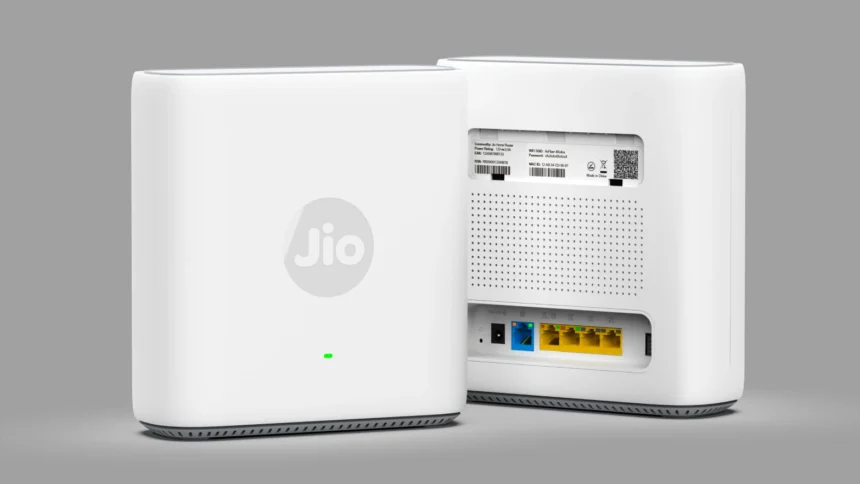
A few months ago, Jio launched its Best Extender router Jio AX6000 Universal Router, an upgraded version of the Jio AirFiber router. Following the success of the Jio AirFiber router, the company has made some changes to its AirFiber router, making it even better and bringing it to market for users. Does this router really deliver the performance the company claims? First, let’s learn a little about Jio Air Fiber, how it works, and what its router looks like.
Jio Air Fiber
Jio Fiber cable hasn’t yet reached most areas in India, or it may take a long time. Keeping this in mind, the company has used Air Fiber to deliver internet to homes, using the existing 5G network. This allows internet to be delivered directly to homes without the need for fiber cables.
To install Air Fiber, internet is delivered directly to homes through a rooftop antenna. An antenna is installed on the rooftop, facing a nearby Jio 5G tower, where it can provide high-speed 5G internet. A cable will descend from the rooftop antenna to the home, connecting to the Jio Air Fiber router. This Air Fiber router will then provide internet throughout the home via LAN cable and WiFi. The antenna will receive internet from a nearby 5G Jio tower, and the router will provide a good range of network coverage via WiFi.
Read Also: Elon Musk may soon get Starlink Licence in India
This initiative has been particularly successful for rural and urban areas, and has proven to be a significant success. But it is a bit more expensive than the normal Jio Fiber and its plans are also a bit more expensive, but it is a good option to provide internet in remote areas until Jio Fiber reaches there.
This Jio Air Fiber router has now been upgraded to Jio Ax6000 Mesh Router. The company claims that this router will provide full range coverage to a 2000 sq ft house. Its purpose is to provide full range to areas where WiFi range is not reaching through Ethernet cable from Jio Fiber or any other company’s main router and provide good speed and better coverage. Now let us know a little about this good router.
Jio AX6000 Universal Wi-Fi 6 Gaming Router
As the name suggests, it’s called “Universal Wi-Fi 6 Router,” which suggests it can deliver high speed internet upto 6Gb/s without any lag. Geek Looper also purchased and reviewed this router to determine if it’s truly a better router, or just like Jio Fiber’s main router.
The Jio AX6000 Universal Wi-Fi 6 Router is essentially the same router as AirFiber, as indicated by a sticker on the back of the router, indicating that it’s an updated version of the AirFiber router. The company has made it universal by making some firmware and hardware updates. Now, you might be wondering what a universal router is. A universal router is one that can work with any internet provider. Just like routers like TP-Link, D-Link, Tenda, etc., can work with any ISP, this one also works with all internet provider companies. However, it offers more features than other routers, which sets it apart from other routers. It also works as an extender.
Suppose your house is a bit wider and bigger, with two floors above the ground floor, and your main router is installed on the ground floor. In such a situation, the WiFi signal doesn’t reach the first and second floors well, or it’s very weak, resulting in poor internet speed. In such a situation, this router can be installed on the first floor and, connecting to the main router, provides full-speed internet with full WiFi range on the first and second floors. However, it must be connected to its WAN port via an Ethernet cable to provide internet access to the first and second floors.
Since its technology is based on WiFi 6, it is capable of providing very good coverage and high-speed internet. WiFi 6 works on advanced technology which keeps the data secure and provides good cyber security so that the router cannot be hacked and no virus-laden file or website data is downloaded from the internet.
Cabality of Jio AX6000
There’s no doubt that this router is the best, with advanced technology that provides both speed and security. The Jio Ax6000 has a good range, covering almost the entire home. This router has multiple features that set it apart from its competitors.
The Jio Ax6000 Router is designed to work with any internet provider, whether fiber, broadband, or DSL. It uses IP over DHCP connections, and as the name suggests, Ax6000, which means it offers fast Wi-Fi 6 speeds of up to 6 Gbps, a feat unmatched by its competitors. It can easily download and stream large files in 4K/8K formats without any lag, and it also supports streaming without buffering. However, you’ll need a high-speed internet plan.
This router features MU-MIMO and OFDMA, allowing it to connect multiple devices simultaneously. This means all the phones, computers, laptops, tablets, and TVs in the home can be connected simultaneously. And, importantly, its speed won’t decrease even with so many devices connected. It will continue to deliver internet to all devices at the same speed. It can also effectively manage network traffic. Connecting so many phones and devices can put a strain on the router, potentially leading to network traffic congestion and slow internet speeds. However, with this technology, it’s capable of handling 100 or more devices simultaneously, allowing you to stream, browse, and download content simultaneously without interruption.
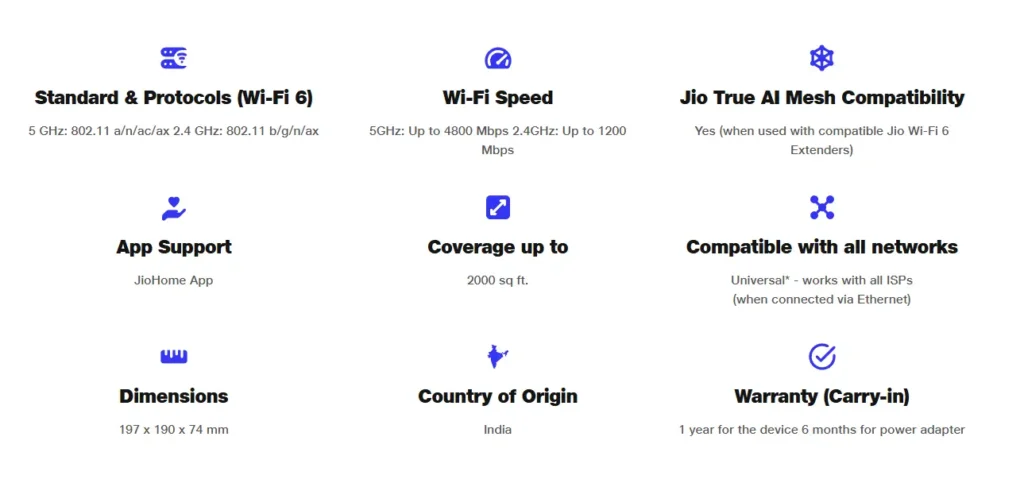
What makes it even more special is its single SSID smart roaming WiFi. This router leverages dual-band technology to provide high-speed internet, making it a dual-band router. However, dual-band routers require repeated WiFi connections using two SSDs, meaning two different names. 2.4GHz offers wider range but slow speed, while 5GHz offers shorter range but high speed internet.
Therefore, this router has a special feature that allows you to connect to only Single SSID, and the router will automatically ensure the high speed. The further you move from the router, the slowest the speed, and the closer you get, the full high speed. However, this eliminates the problem of WiFi scrambling. With a single SSID, you can move around the house, and the router will automatically adjust everything.
With so many features, the router also needs to be controlled, optimizing which features to use. To address this, Jio has created the Jio Home app, which connects directly to Jio TVs and routers. The Jio Home app gives you complete control of this router, whether it’s changing the password or setting a temporary password for guests. Another special feature is that it also allows you to use the child control feature. You can control what and how much your child can watch using this app. You can also choose which websites or apps to block.
Read Also: Reliance Jio 5.5G: It Can Go Up to 10Gb/s is That True?
It’s capable of providing powerful Wi-Fi coverage in a large home of up to 2,000 square feet. This will eliminate the hassle of streaming without interruptions or while sitting near the Wi-Fi network. This router also supports mesh. Mesh means this router will be connected to your main router, eliminating the hassle of having two routers. If you want to use this router as your primary router, you can do that as well.
After connecting to your main router via an Ethernet cable, you can setup the mesh connection with the main router and use it as your primary router. It will work properly with the main router, just like the main router. However, this router does not support IPoE and PPPoE connections. So, the question now is how to activate it. Will it work as soon as the cable is connected? Yes, it will, but it will require setup from Jio Home. This is a one-time process. Let’s learn how this setup works.
Jio Home Setup of Jio AX6000 Router
Once you’ve received and unboxed the Jio AX6000, turn it on with the power adapter and connect it to your main router via an Ethernet cable. Make sure to connect the cable from the main router’s normal LAN port to the blue WAN port on the back of the Jio AX6000 router. The router is now on, and the red light should be blinking. Open the Jio Home app and you’ll see the “Add Extender or Router” option.
Clicking on it will prompt you to scan the QR code, which you’ll find on the back of the Jio AX6000 router. After scanning it, set up your WiFi network, choosing the name and password. After setting up, a green light will appear on the router, meaning the router is now enabled. Now all the devices in the house can connect to it and use high speed internet.
Jio AX6000 Price
Jio has launched its powerful router for ₹5,999. It may be a bit expensive, but it’s a great value in terms of features. It’s listed on Jio’s official website for ₹5,999, and on Amazon, redirected from the Jio’s official website, it’s priced at ₹6,505. This router justifies its price with features like mesh, low latency gaming, parental controls, a single SSD, and a host of other features. There’s nothing wrong with buying this router with its wide range. But one thing to keep in mind is whether you really need it. Is it even better than Jio’s main router? Let’s see Geek Looper’s conclusion.
Is Jio AX6000 is Better Than Jio Fiber Router?
There’s no doubt that this router is very powerful and offers excellent speeds. But how much better is it than the main router that comes with Jio Fiber? After using both routers, Geek Looper found that the Jio AX6000 has some advanced features that the main Fiber router lacks. Features like single SSD, WiFi 6, guest WiFi, etc. are missing. However, the Jio Fiber router’s range is no less than this router’s. Since the router is designed with features in mind and offers advanced features, Jio Fiber lags behind.
Now, let’s discuss whether it’s really needed. If your home or office isn’t too large, and it’s a single- or double-story building with ventilation that doesn’t hinder your WiFi range, the router that comes with Jio Fiber is sufficient, and it’s also incredibly powerful. You don’t need to purchase a new extender or router just for this. The Jio Fiber router itself is powerful enough to provide WiFi coverage throughout a large home, and being a dual-band router, it also easily provides high-speed internet.
However, if your home or office is wide and you need more range and speed, you can consider the Jio AX6000 router, which can provide high-speed internet with a good range beyond the main router. This router is ideal for locations with a large number of people, such as offices, who need to connect to a single WiFi network, as it can control over 100 devices simultaneously. Also, all the work can be done with a single SSID, along with this you can also keep a guest password in it so that after giving the password to someone, that password gets deleted automatically after a few hours.